Great Expectations data validation is one of the most reliable ways to stop bad data before it reaches your analytics, models, and dashboards. Pipelines are only as trustworthy as the data flowing through them, and quality failures rarely announce themselves. A job finishes green, the tables load, and a null explosion or a silently duplicated key only surfaces weeks later inside a board report. That gap between "the pipeline ran" and "the data is correct" is exactly what Great Expectations was built to close, and it sits at the center of any serious data quality strategy.
Great Expectations, now usually shortened to GX, is an open-source Python framework that lets teams write validation rules as code, run them automatically at any pipeline stage, and publish human-readable reports of what passed and what failed. The catch is that GX changed a lot. The 1.0 rewrite reorganized the entire API, and the older great_expectations init CLI, Datasource, and Validator objects that fill most online tutorials no longer exist. This guide targets the current line, GX Core 1.x (version 1.23 as of September 2026, according to the project's release history on PyPI), so the concepts and code here match the framework you actually install today.
The goal is practical: understand what GX is, how its current architecture works, how to ship your first automated validation, and where the tool fits inside a broader quality program. For the deeper production and orchestration patterns, this article points you to the right next steps rather than trying to cover everything at once.
What is Great Expectations (GX)?
Great Expectations is a declarative data quality framework. You define "Expectations", verifiable assertions about your data such as "order_id is unique" or "amount is never negative", collect them into suites, and run them against real batches of data. GX checks each assertion, returns a structured result, and can generate Data Docs, browsable HTML documentation that shows exactly which rules held and which broke. Because Expectations are plain Python, they live in version control and move through pull requests like any other code.
The project ships in two flavors. GX Core is the open-source library under the Apache 2.0 license, the engine you run yourself inside pipelines, notebooks, and CI. GX Cloud is a hosted SaaS platform built on top of that engine, adding a shared UI, role-based access, a data health dashboard, anomaly detection, and AI-assisted rule suggestions for teams that want collaboration and governance without building it themselves. Both use the same validation concepts, so the mental model in this guide applies whether you stay on Core or adopt Cloud later.
One point saves a lot of confusion: GX formally sunset every version at or below 0.18. If you find a snippet calling ge.from_pandas(), running great_expectations init, or wiring up a Validator, it belongs to the legacy API and will not run on a current install. The 1.x architecture replaced all of that with a cleaner, object-based flow described in the next section.
How Great Expectations works: the GX Core architecture
Current GX Core follows a consistent four-step rhythm: set up an environment, connect to data, define Expectations, and run validations. Underneath that rhythm sits a small set of building blocks. Understanding these objects is the difference between copying a snippet and designing validation that scales.
| Component | What it is | Role in the flow |
|---|---|---|
| Data Context | The entry-point object, created with gx.get_context() | Holds configuration, metadata, and results for the whole project |
| Data Source | A connection definition (pandas, Spark, or a SQL engine) | Tells GX how to reach your data |
| Data Asset | A collection of records inside a Data Source | Represents a table, query, or dataframe |
| Batch Definition | A rule for slicing an Asset | Turns an Asset into retrievable Batches (whole table, daily, monthly) |
| Batch | The actual records validated in one run | The concrete data GX inspects |
| Expectation | A single verifiable assertion | One rule, such as "not null" or "between 0 and 10,000" |
| Expectation Suite | A named collection of Expectations | Groups the rules for one dataset |
| Validation Definition | A link between a Batch Definition and a Suite | Says which data is checked against which rules |
| Checkpoint | A runnable production artifact | Executes one or more Validation Definitions and triggers Actions |
| Data Docs | Generated HTML reports | Shows results in plain language for the whole team |
GX Core building blocks and how they connect, from connection to reporting. Source: Great Expectations official documentation.
The flow reads top to bottom. A Data Context connects to a Data Source, which exposes Data Assets. A Batch Definition slices an Asset into a Batch. A suite of Expectations describes what that data should look like. A Validation Definition marries the batch to the suite, and a Checkpoint runs the whole thing in production and fires Actions such as alerts or result storage. That chain is the single most important thing to internalize about modern GX, and it is what most outdated tutorials get wrong.
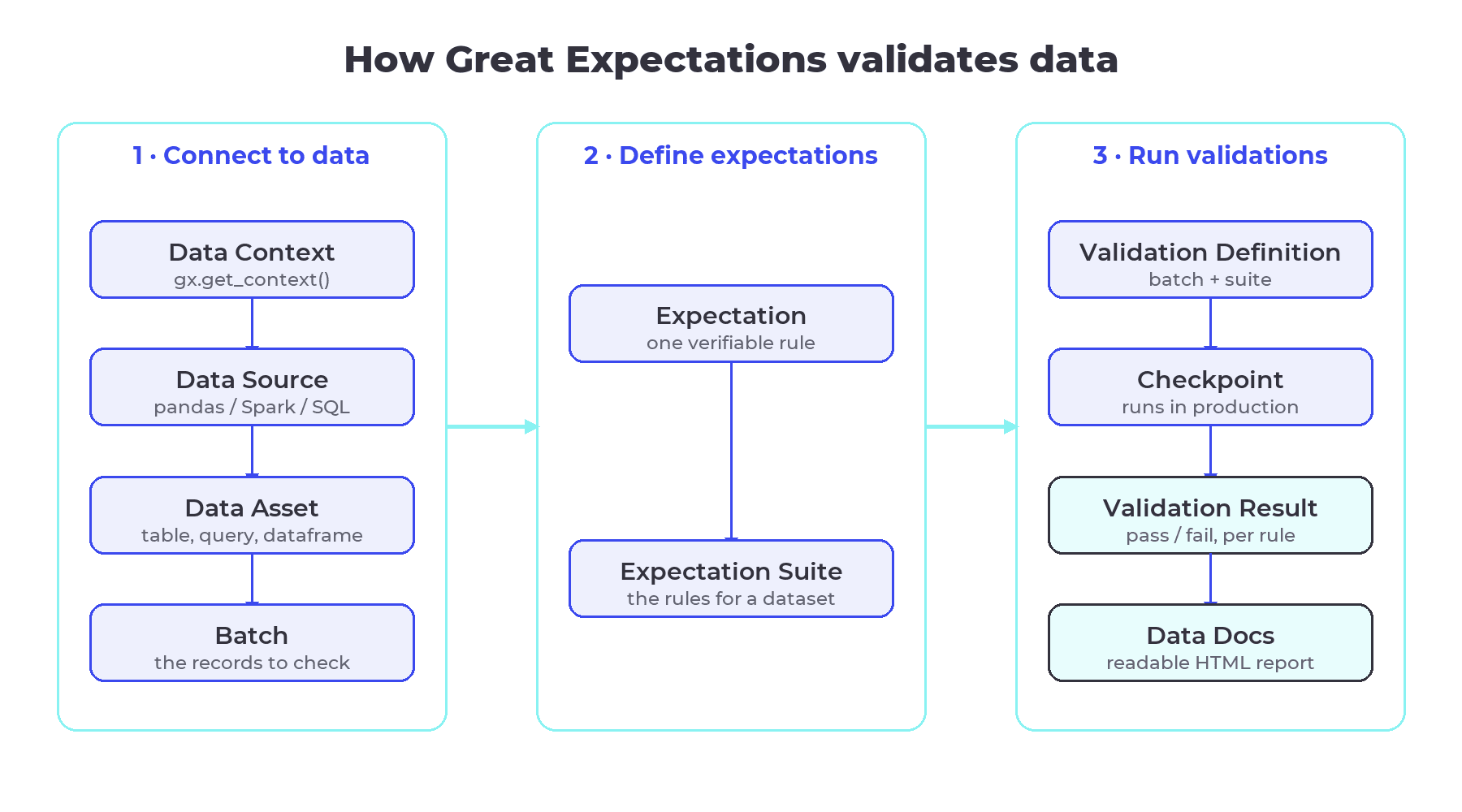 The GX Core validation flow: data connection on the left, rule definition in the middle, and validation plus reporting on the right.
Your first automated data validation with GX
The fastest way to understand GX is to run a validation end to end. Install the library first, following the official GX Core documentation. GX Core supports Python 3.10 to 3.13:
pip install great_expectations
The example below validates a pandas dataframe of orders. It is the full path from raw data to a validation result, using the current 1.x API:
import great_expectations as gx
import pandas as pd

# 1. Data Context: the root of every GX project
context = gx.get_context()

# 2. Load data and connect a Data Source, Asset, and Batch
df = pd.read_csv("orders_2026_01.csv")
data_source = context.data_sources.add_pandas("orders_source")
data_asset = data_source.add_dataframe_asset(name="orders")
batch_definition = data_asset.add_batch_definition_whole_dataframe("daily_batch")
batch = batch_definition.get_batch(batch_parameters={"dataframe": df})

# 3. Build an Expectation Suite with a few high-value rules
suite = context.suites.add(
    gx.core.expectation_suite.ExpectationSuite(name="orders_suite")
)
suite.add_expectation(
    gx.expectations.ExpectColumnValuesToBeUnique(column="order_id")
)
suite.add_expectation(
    gx.expectations.ExpectColumnValuesToNotBeNull(column="customer_id")
)
suite.add_expectation(
    gx.expectations.ExpectColumnValuesToBeBetween(
        column="amount", min_value=0, max_value=10000, mostly=0.99, severity="warning"
    )
)

# 4. Tie the batch to the suite, wrap it in a Checkpoint, and run
validation_definition = context.validation_definitions.add(
    gx.core.validation_definition.ValidationDefinition(
        name="orders_validation", data=batch_definition, suite=suite
    )
)
checkpoint = context.checkpoints.add(
    gx.checkpoint.checkpoint.Checkpoint(
        name="orders_checkpoint", validation_definitions=[validation_definition]
    )
)
result = checkpoint.run()
print(result.describe())
Two parameters in that snippet matter in practice. The mostly=0.99 argument tells GX to pass the rule when at least 99% of rows comply, which prevents brittle checks from failing on a handful of edge cases. The severity="warning" flag lets you separate rules that should block a pipeline from rules that should only raise a flag, a distinction that becomes essential once validations gate real jobs.
Switching engines is mostly a matter of the Data Source. For a SQL warehouse you connect with a dedicated method and point at a table or a query:
pg = context.data_sources.add_postgres(
    "warehouse",
    c,
)
orders = pg.add_table_asset(name="orders", table_name="orders")
daily = orders.add_batch_definition_daily(name="by_day", column="created_at")
GX Core ships equivalent methods for Snowflake, BigQuery, Databricks SQL, Redshift, SQL Server, and Microsoft Fabric, plus add_spark for distributed validation on Spark dataframes. For warehouse sources, pushing the checks down to SQL means validation runs where the data already lives, so you avoid moving large tables around.
Finally, Data Docs turn results into something the whole team can read. Persistent Data Docs require a file-backed context rather than the default in-memory one:
context = gx.get_context(mode="file")
# ... connect data, run a checkpoint ...
context.build_data_docs()
context.open_data_docs()
That command writes a static HTML site showing every Expectation and its outcome, which product, analytics, and operations teams can open without touching Python.
Designing expectation suites that catch real problems
The most common mistake with GX is trying to test everything on day one. Suites bloat, false positives pile up, and the team stops trusting the alerts. A better approach starts with a small set of guardrails on the fields that would cause real damage if they broke, then grows coverage as confidence builds.
It helps to think in layers, from the shape of the whole table down to relationships between columns:
| Layer | Example expectations | Why it matters |
|---|---|---|
| Table | Row count within a range, expected columns present, freshness | Catches missing loads and structural breaks |
| Schema | Column types, allowed value sets, ID and email patterns | Catches upstream format and contract changes |
| Column | Not-null keys, unique identifiers, numeric ranges, string length | Catches the errors that corrupt joins and metrics |
| Cross-column | order_total >= sum(line_items), delivered_at >= shipped_at | Encodes business logic that single-column checks miss |
Start with the column and cross-column rules that protect your primary keys and core metrics, since those are the failures that quietly poison dashboards. Use the mostly parameter to build in realistic tolerance, and lean on dynamic thresholds, such as "row count must not drop more than 10% against the seven-day average", instead of hard-coded numbers that break every time the business grows. Encoding producer and consumer agreements as suites also turns GX into a lightweight way to enforce data contracts at the point where data enters your platform.
Where GX fits in pipelines and orchestration
A validation you run by hand protects nothing. The value shows up when Checkpoints run automatically as part of your pipelines, so quality is enforced on every load rather than remembered occasionally. In an orchestrator like Airflow, you trigger a Checkpoint at the end of a task and let a failure stop downstream steps. Our guide to orchestration with Apache Airflow covers the scheduling and dependency patterns that make this dependable. On Databricks, Checkpoints run inside jobs with the Spark backend, which suits very large tables. In CI/CD, a lightweight suite against test data can fail a pull request before a breaking change ever reaches production.
Two design choices keep production validation healthy. Store Validation Results and Data Docs in durable object storage such as S3, GCS, or Azure Blob, which gives you an auditable history and a single place stakeholders check status. And validate partitions rather than full tables where you can, using batch definitions like add_batch_definition_daily, so a daily job only inspects the day it loaded. For the full development-to-deploy workflow, including CI patterns and alerting, our deeper walkthrough on Great Expectations in production pipelines picks up where this section leaves off.
It is worth being honest about the limits. GX Core is batch-oriented, so streaming pipelines need you to validate micro-batches or check data at the points where it lands in tables. Anomaly detection and a managed health dashboard live in GX Cloud, not in the open-source library, so on Core you build alerting and trend tracking yourself. And suites are living artifacts: as schemas evolve, rules need maintenance, which is why versioning them and planning for schema drift matters as much as writing the first checks.
Where GX fits in a broader data quality strategy
Great Expectations is a strong tool for explicit, rule-based validation, and it is one layer of a larger picture. Rule-based checks answer "does this data match the rules I already know?". They pair well with observability platforms that detect anomalies you did not anticipate, with data contracts that formalize producer and consumer agreements, and with the operating model of data reliability engineering that assigns ownership and incident response to quality itself. If you are weighing GX against hand-rolled checks, our comparison of Great Expectations versus custom validation scripts works through when each approach scales. For the full framing of accuracy, completeness, and trust, the pillar on what data quality is and how to measure it is the place to start.
Because BIX works across the full spectrum of data platforms, from warehouses and lakehouses to orchestration and observability stacks, the right validation setup depends on your architecture rather than on a single favorite tool. GX fits naturally where you need transparent, testable rules that non-technical stakeholders can also read.
Validation rules work best inside a broader habit of testing pipelines the way software teams test code, an argument made in why data teams need automated testing too.
Automated data validation with Great Expectations pays off quickly: fewer silent failures, faster root-cause analysis, and decisions people can actually trust. Start with the handful of rules that protect your most important datasets, wire a Checkpoint into your orchestrator, publish Data Docs so the business can self-serve the results, and expand coverage from there. If your team is operationalizing data quality and wants to get the architecture right the first time, our specialists can help you design validation and reliability that fit your stack. Talk to our team and move your data maturity forward. ⬇️

FAQ
What is Great Expectations used for? Great Expectations is an open-source Python framework for automated data validation and quality testing. Teams use it to define rules about their data, such as uniqueness, not-null, valid ranges, and business logic, run those rules against real batches inside pipelines, and publish readable reports called Data Docs. The result is early detection of bad data before it reaches analytics, models, or dashboards.
What changed in Great Expectations 1.0 compared to 0.18?
GX 1.0 was a full rewrite that reorganized the API and sunset every version at or below 0.18. The legacy great_expectations init CLI, Datasource, and Validator objects were removed. Current GX Core uses a Data Context, Data Sources, Data Assets, Batch Definitions, Expectation Suites, Validation Definitions, and Checkpoints. Older tutorials based on the 0.x API will not run on a current install.
Is Great Expectations free? What is the difference between GX Core and GX Cloud? GX Core is free and open source under the Apache 2.0 license, and you run it yourself. GX Cloud is a paid hosted platform built on the same engine, adding a shared UI, role-based access, a data health dashboard, anomaly detection, and AI-assisted rule suggestions. Both share the same validation concepts, so teams often start on Core and adopt Cloud for collaboration and governance.
Does Great Expectations work with Spark, SQL warehouses, and Airflow? Yes. GX Core connects to pandas and Spark dataframes and to SQL engines including Snowflake, BigQuery, Databricks SQL, Redshift, PostgreSQL, SQL Server, and Microsoft Fabric. For warehouses it pushes checks down to SQL so validation runs where the data lives. It integrates with orchestrators like Airflow and Databricks by running Checkpoints as pipeline steps that can block downstream jobs on failure.
When should you use Great Expectations instead of dbt tests or custom scripts? Use GX when you need rich, reusable rules across engines, cross-batch and business-logic checks, and documentation the whole team can read. dbt tests fit SQL transformation layers well, and many teams run both for defense in depth. Custom scripts can work for a single simple check, but GX scales better as coverage, ownership, and reporting requirements grow.