Every data team reaches a point where cron jobs and hand-wired scripts stop scaling. A report depends on three loads that must finish first, one of them fails silently at 2 a.m., and nobody notices until a dashboard is wrong. Workflow orchestration is the discipline that fixes this: it turns a pile of independent jobs into a single, observable system that runs tasks in the right order, retries what breaks, and tells you when something is off. Apache Airflow is the most widely adopted open-source engine for that job, and it remains a de facto standard for data pipeline orchestration.
This guide is the map of the territory, not a line-by-line tutorial. It explains what orchestration solves, how Airflow is built, how DAGs and tasks actually behave, how scheduling and execution work, and what running Airflow in production really demands. It also draws the boundary: where Airflow is the obvious choice, and where a different tool fits better.
The stakes are practical. A pipeline that looks fine on the first run can fall apart on the thousandth, when data volumes grow, dependencies multiply, and one late upstream file cascades into a day of stale numbers. Getting orchestration right is what separates a data platform that people trust from one they quietly work around.
What is workflow orchestration, and what problem does it solve?
Workflow orchestration is the coordination of many interdependent tasks into a reliable, repeatable process. The orchestrator decides what runs, in what order, under which conditions, and what happens when a step fails. It is the layer above your individual jobs, the one that knows the extract must finish before the transform, and the transform before the load.
Cron and shell scripts handle the first version of this well enough. They break on everything that comes after: there is no shared view of what ran, no dependency graph, no retry logic that understands "task B should not start until task A actually succeeded," and no history you can inspect when a number looks wrong. As pipelines grow from five steps to five hundred, that missing structure becomes the bottleneck.
A dedicated orchestrator solves a specific set of problems. It models dependencies explicitly, so order is guaranteed rather than hoped for. Scheduling is centralized, which makes runs predictable and auditable. Failure becomes a first-class concern, handled with retries, alerts, and the ability to rerun only the part that broke. On top of that, you get observability, a single place to see what ran, what is running, and what failed. If you want the wider context beyond a single engine, our primer on data orchestration covers the concept end to end.
How Apache Airflow works: architecture and components
Airflow is a distributed system, even when it runs on one machine. Understanding its parts is the fastest way to understand what it can and cannot do. The current line, Apache Airflow 3, reached general availability on April 22, 2025, and the project reached version 3.3.2 by September 2026. Airflow 3 reworked the execution model significantly, so component names and responsibilities below reflect that architecture, not the older 2.x layout.
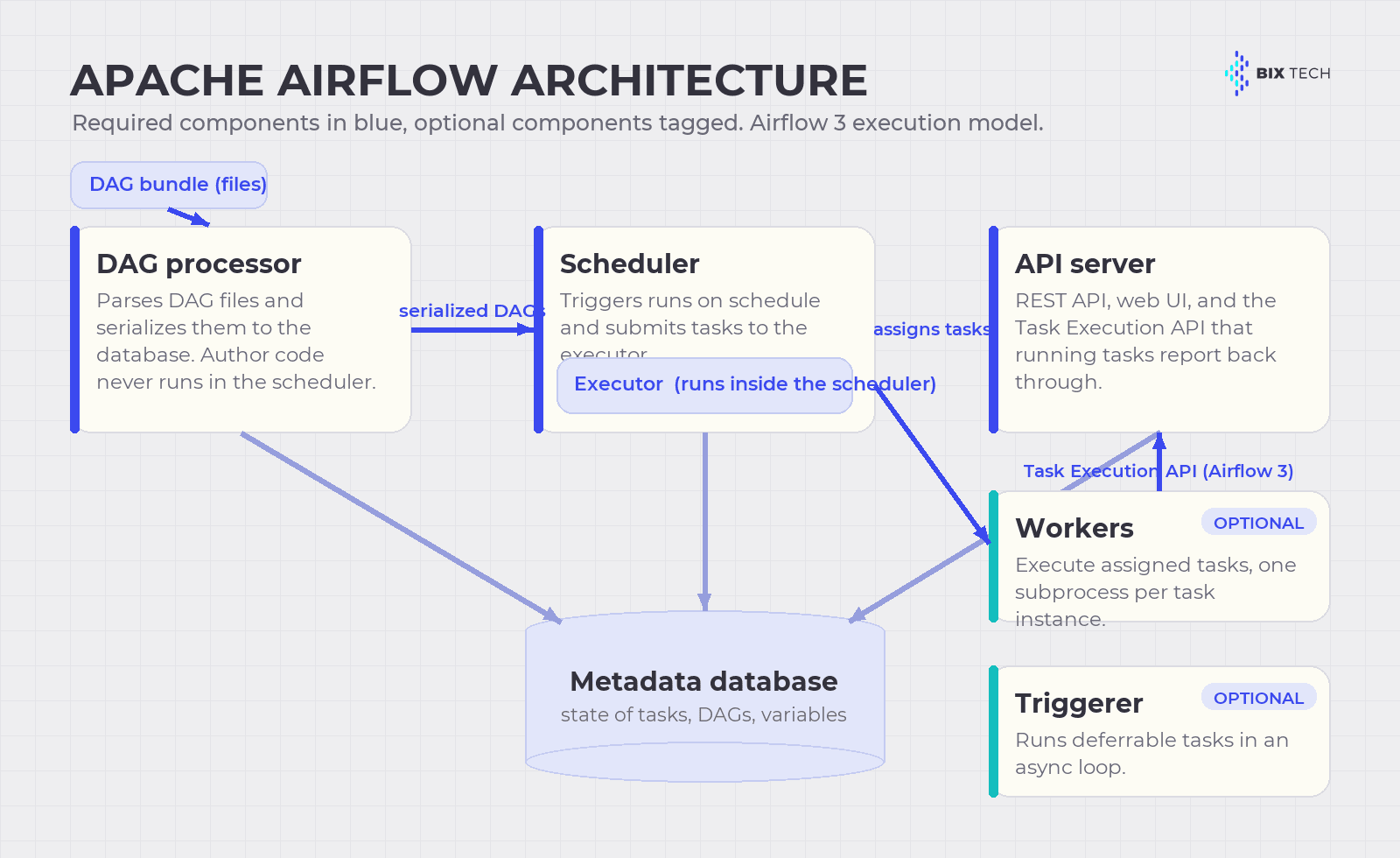 Airflow's core components and how they communicate. In Airflow 3, workers talk to the API server through the Task Execution API instead of touching the metadata database directly.
At the center is the scheduler. It triggers scheduled workflows and hands tasks to the executor to run. A detail that trips people up: the executor is a configuration property of the scheduler, not a separate service, and it runs inside the scheduler process. A separate DAG processor parses pipeline files from a DAG bundle and serializes them into the metadata database, which keeps DAG-author code from ever executing inside the scheduler itself. The API server serves the REST API, presents the user interface, and, in Airflow 3, receives all communication from running tasks through the Task Execution API. Underpinning all of it, the metadata database, usually PostgreSQL or MySQL, stores the state of every task, DAG, and variable.
Two components are optional. Workers execute the tasks the scheduler assigns, each task instance running in its own subprocess. The triggerer runs deferred tasks in an async event loop, and you only need it when you use deferrable operators. A summary of responsibilities appears in the table below.
| Component | Required? | Responsibility |
|---|---|---|
| Scheduler | Yes | Triggers runs on schedule; submits tasks to the executor (which runs inside it) |
| DAG processor | Yes | Parses DAG files from the bundle, serializes them to the database, isolates author code |
| API server | Yes | REST API, web UI, and the Task Execution API that tasks report back through |
| Metadata database | Yes | Source of truth for task, DAG, and variable state (PostgreSQL or MySQL) |
| Workers | Optional | Execute assigned tasks, one subprocess per task instance |
| Triggerer | Optional | Runs deferred/deferrable tasks in an async loop |
The most important architectural change in Airflow 3 is that tasks no longer need direct access to the metadata database. They communicate with the platform through the Task Execution API, which decouples workers from the core and enables the Task SDK. In practice, that means execution can happen in almost any environment, and the Python Task SDK keeps existing pipelines working while SDKs for other languages, starting with Go and Java, are experimental as of the 3.3 line.
The building blocks: DAGs, tasks, operators, and sensors
An Airflow pipeline is a DAG, a directed acyclic graph. "Directed" means each dependency points one way, and "acyclic" means it never loops back on itself, so the graph always has a clear start and end. The DAG is the blueprint that defines which tasks exist and how they depend on each other.
A task is a single unit of work, one node in the graph. Operators are the templates that define what a task actually does: a PythonOperator runs a function, a BashOperator runs a command, and provider packages ship operators for databases, cloud services, and dozens of other systems. Sensors are a special kind of operator that waits for a condition, such as a file landing in storage or a partition appearing in a warehouse, before letting downstream tasks proceed. Dependencies between tasks are declared explicitly, and that declaration is what gives the scheduler its execution order.
Modern Airflow adds ergonomics on top of these primitives. The TaskFlow API lets you write tasks as decorated Python functions and pass data between them without manually managing XCom, the mechanism for exchanging small values between tasks. Dynamic task mapping generates tasks at runtime from a list, so you can fan out over an unknown number of files without hand-writing each branch. These are the tools that keep large pipelines readable. For the working mechanics of each concept, see our deep dive on Apache Airflow concepts every engineer should know, and for structuring graphs that stay fast at scale, our guide to Airflow DAG design patterns.
Scheduling: time, events, and data assets
Airflow schedules work in three broad ways, and choosing the right one is a design decision, not a detail.
Time-based scheduling is the classic mode. You give a DAG a schedule, expressed as a cron string or a timetable, and Airflow runs it on that cadence. Two behaviors matter here. Catchup controls whether Airflow backfills runs for intervals that passed while the DAG was off; Airflow 3 changed the default to catchup=False, a safer production default that older pipelines relying on implicit catchup need to account for. Backfills, the deliberate reprocessing of a past date range, are now managed by the scheduler itself and can be started and monitored from the UI or API, which makes large historical reloads far easier to control.
Event-driven and data-aware scheduling is where Airflow has moved fastest. Instead of running on a clock, a DAG can run when data it depends on is updated. Airflow 3 promoted the former "Datasets" into first-class Assets and added Watchers, which let Airflow react to events happening outside of Airflow, such as an external system writing to a data store, with an out-of-the-box integration for AWS SQS. This decouples producers from consumers: a downstream pipeline runs because its input actually changed, not because the clock says it might have.
The practical guidance is to prefer data-aware scheduling when correctness depends on freshness, and time-based scheduling when a predictable cadence is what the business needs. Mixing them thoughtfully, a nightly cadence with asset triggers for urgent updates, is common and reasonable.
Executors and where tasks run
The executor determines where and how tasks actually execute, and it is one of the biggest levers on cost and scale. Airflow ships several, and the right one depends on your workload shape.
The LocalExecutor runs tasks in the scheduler's process on a single machine, which is ideal for development, testing, and small deployments; it replaced the old SequentialExecutor, which was removed in Airflow 3. For steady, high-volume production across many machines, the CeleryExecutor sends tasks to a queue that a pool of persistent workers pulls from. The KubernetesExecutor launches one pod per task, giving each task an isolated, customizable environment that scales elastically, at the cost of pod startup latency that makes it less efficient for very short tasks. Running tasks outside the core data centers is the job of the EdgeExecutor, available as a provider package. Other provider packages add more options, such as the AWS ECS and Batch executors.
Two facts are worth keeping straight. The statically coded hybrid executors, LocalKubernetesExecutor and CeleryKubernetesExecutor, are no longer supported as of Airflow 3.0. And since Airflow 2.10 you can configure multiple executors at once and choose one per task, so a single deployment can send heavy isolated jobs to Kubernetes while lightweight tasks stay on Celery.
Running Airflow in production: reliability, observability, and security
The gap between a DAG that runs and a pipeline you can trust is filled with operational discipline. Three areas matter most.
Reliability starts with idempotency: a task should produce the same result whether it runs once or five times, because retries and backfills will run it more than once. Design loads to be partition-aware and safe to rerun, set sensible retries and retry delays, and let the orchestrator reprocess a bad date range through a scheduler-managed backfill rather than a manual scramble. Failure handling is a feature you configure, not an afterthought.
Observability is what makes failures survivable. Airflow's UI shows the state of every run, task, and log, and in Airflow 3 each run is tied to the exact DAG version that produced it. Beyond the built-in view, teams push metadata and lineage to external systems; our walkthrough on integrating Airflow with OpenLineage covers full traceability, and the guide to building alerts with Grafana and Airflow shows how to get signal without alert fatigue. Note that the classic SLA feature was removed in Airflow 3.0 and is being replaced by Deadline Alerts, introduced in the 3.1 line, so pipelines that relied on the old SLAs need to migrate. Data-quality checks belong inside the pipeline too, as our playbook on automated data testing with Airflow and Great Expectations demonstrates.
Security and access control are the third pillar. Airflow separates roles, the deployment manager, DAG authors, and operations users, so that a distributed deployment can restrict who runs what and where code executes. Secrets should never live in DAG code. Airflow reads connections and variables from environment variables and the metadata database by default, and supports external secrets backends such as AWS Secrets Manager, Google Secret Manager, HashiCorp Vault, and Azure Key Vault so credentials stay in a dedicated vault. Role-based access in the UI and API rounds out the model. Scaling then becomes a matter of matching the executor to load, sizing workers and the database, and keeping DAG parsing fast so the scheduler is never starved.
When Airflow fits, and when another approach is better
Airflow earns its place when you have complex, scheduled or event-driven data pipelines with real dependencies, a Python-fluent team, and a need for a mature ecosystem of integrations. It is less of a fit when the problem is narrow or shaped differently. The decision matrix below is a starting point, not a verdict.
| Your situation | Airflow tends to fit | Consider an alternative |
|---|---|---|
| Complex multi-step data pipelines with dependencies | Strong fit; this is its core use case | Not needed |
| Team lives in Python and wants code-defined pipelines | Strong fit via the Task SDK and TaskFlow | Low-code tools if authors are non-engineers |
| Pure SQL transformations inside the warehouse | Airflow can orchestrate the run | dbt owns the transformation itself |
| Long-running, stateful, mission-critical workflows | Workable, but not its sweet spot | Temporal for durable execution |
| Sub-second, real-time streaming | Not designed for it | A stream processor such as Kafka or Flink |
| Small team wanting minimal ops overhead | Managed Airflow reduces the burden | A lighter or fully managed orchestrator |
The alternatives are worth naming honestly. Dagster and Prefect are modern orchestrators with different developer experiences and opinions about assets and testing; our comparison of Airflow vs Dagster vs Prefect breaks down where each fits. Temporal targets durable, code-first workflows where every step must survive a crash. And dbt complements Airflow rather than competing with it: it transforms data inside the warehouse, while Airflow orchestrates when and in what order that transformation runs. At BIX Tech we work across all of these, plus the managed and cloud-native options, because the right orchestration layer depends on the team, the stack, and the workload, never on a single default answer.
How to choose and implement an orchestration platform
The choice comes down to a short list of criteria, weighed against your reality rather than a feature checklist. Start with the workload: batch versus streaming, scheduled versus event-driven, simple versus deeply interdependent. Weigh your team's skills, because a Python-first tool is a gift to engineers and a wall to analysts. Factor in the ecosystem, since the value of an orchestrator is often the breadth of its integrations. Then weigh operations and cost: whether you run it yourself or buy a managed service.
That last decision is often the pivotal one. Self-managed Airflow gives you full control and no license fee, but you own upgrades, scaling, and uptime. Managed platforms trade money for that burden, and the market is mature: Amazon MWAA runs Airflow 3 within AWS, Google's Cloud Composer (now branded a managed service for Apache Airflow) does the same on Google Cloud, and Astronomer's Astro runs multi-cloud and is typically first to support new Airflow versions. Whichever path you take, implement incrementally: start with one real pipeline, make it idempotent and observable, prove the operational model, and only then expand. The teams that succeed treat orchestration as core infrastructure, versioned, tested, and monitored, rather than as a cron replacement.
Workflow orchestration is ultimately about trust: a data platform earns it when pipelines run in the right order, fail loudly, recover cleanly, and leave a history you can audit. Apache Airflow gives you a mature, flexible engine to build that on, and the Airflow 3 architecture makes it more decoupled and event-aware than ever, but the engine is only as good as the design and operations around it.
If your team is scaling data pipelines and feeling the limits of scripts and cron, our specialists can help you design an orchestration architecture that fits your stack and your workload. Talk to our team and turn a fragile set of jobs into a platform your business can rely on. ⬇️

What is workflow orchestration in simple terms? Workflow orchestration is the automated coordination of interdependent tasks so they run in the correct order, with built-in retries, scheduling, and monitoring. It replaces brittle cron jobs and scripts with a single system that guarantees dependencies, handles failures as a first-class concern, and gives you a full history of what ran and when.
What is Apache Airflow used for? Apache Airflow is an open-source platform for authoring, scheduling, and monitoring data pipelines defined as code. Teams use it to orchestrate ETL and ELT jobs, machine-learning workflows, and data-quality checks, coordinating tasks across databases, cloud services, and warehouses through a large ecosystem of provider integrations.
What are the main components of Airflow's architecture? Airflow's required components are the scheduler (which contains the executor), the DAG processor, the API server, and the metadata database. Optional components are workers, which run tasks, and the triggerer, which handles deferrable tasks. In Airflow 3, tasks report back through the Task Execution API instead of touching the database directly.
When should you not use Apache Airflow? Airflow is a weaker fit for sub-second real-time streaming, for pure in-warehouse SQL transformation (where dbt fits better), and for long-running durable workflows that must survive crashes (where Temporal fits better). Very small teams that want minimal operations may prefer a managed service or a lighter orchestrator.
Is Apache Airflow free, and what does managed Airflow cost? Apache Airflow is free and open source under the Apache License, so self-hosting has no license fee, only infrastructure and operational cost. Managed options such as Amazon MWAA, Google Cloud Composer, and Astronomer Astro charge for the infrastructure and management they handle, and all three support Airflow 3 as of 2026.