If your data estate runs on Microsoft cloud, the Azure Databricks vs Microsoft Fabric decision is one of the biggest architecture calls you will make this year. Both promise a unified platform for analytics and AI. Both store data in open Delta format, and each one lives inside Azure. Yet the two were built for different kinds of teams, different sets of workloads, and different ways of working.
The confusion is understandable. Microsoft positions Fabric as the all-in-one SaaS analytics platform for the Power BI generation, while Azure Databricks is the lakehouse that data engineers and machine learning teams already trust at scale. Independent 2026 comparisons keep reaching the same verdict: most mature Azure data platforms end up running both. So the useful question is not which tool wins overall, but which one should own which part of your stack.
This guide breaks the decision into the criteria that actually move it: team skills, workload type, machine learning maturity, pricing model, governance, and openness. It also covers the interoperability that changed the calculus in 2026, when OneLake and Unity Catalog started sharing the same physical copy of data. By the end you will have a framework to decide where Databricks fits, where Fabric fits, and when running both is simply the pragmatic answer.
What Azure Databricks and Microsoft Fabric actually are
Azure Databricks is a first-party Azure service, co-engineered by Microsoft and Databricks, built on Apache Spark and Delta Lake. It is code-first: teams work in notebooks using Python, SQL, Scala, or R, and orchestrate pipelines as code. Around that core sit Unity Catalog for governance, MLflow and Mosaic AI for machine learning, Lakeflow and Delta Live Tables for declarative pipelines, and Databricks SQL for warehousing. Because the same platform runs on AWS, Azure, and Google Cloud, skills and code port across clouds. It is tuned for large-scale engineering, streaming, and advanced AI. If you want a deeper look at that model, our guide to Databricks lakehouse architecture walks through it end to end.
Microsoft Fabric is a SaaS analytics suite that reached general availability in late 2023. It is organized around OneLake, a single tenant-wide data lake built on Azure Data Lake Storage that keeps everything in Delta Parquet. Fabric bundles a full set of workloads under one billing capacity: Data Factory for ingestion, Data Engineering for Spark, a T-SQL Data Warehouse, Real-Time Intelligence, Data Science, operational Databases, and Power BI for consumption. It is woven into Microsoft 365, Microsoft Purview, and Power BI, with Copilot available across the experience. Fabric supports both low-code and pro-code work, but its center of gravity is business intelligence and self-service analytics.
Put simply, one platform starts from the engineer's notebook and the other starts from the analyst's report. That difference in origin explains almost every trade-off that follows. If the lakehouse concept itself is new to your team, it helps to first settle which data architecture fits your business before you pick a vendor.
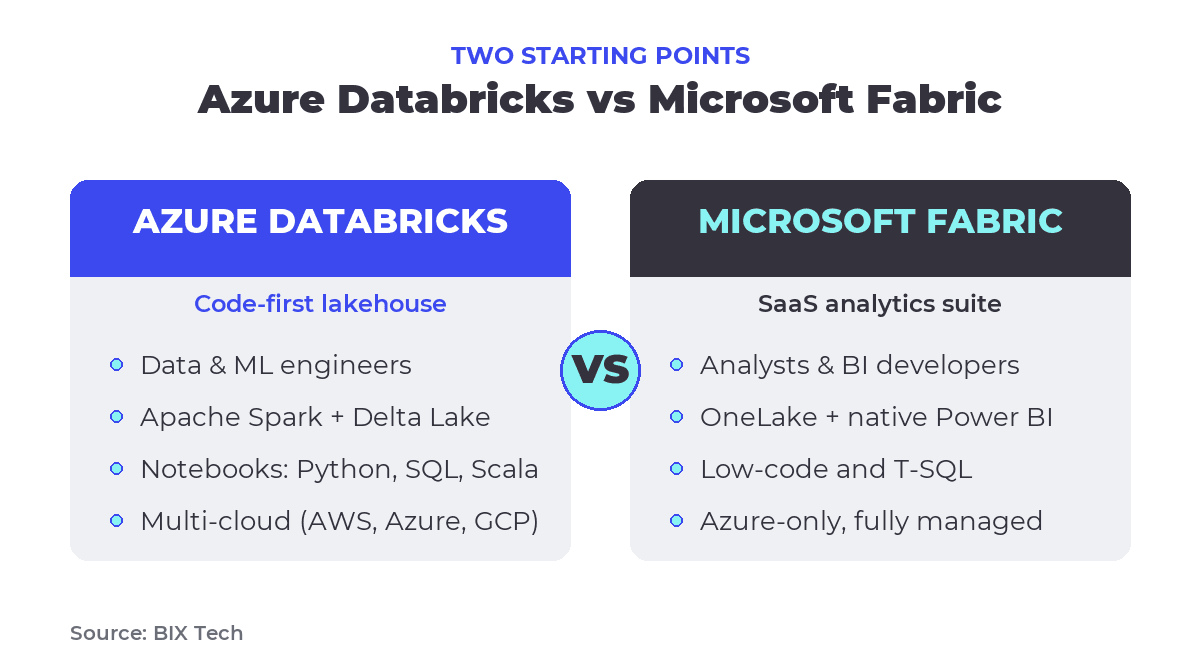 Azure Databricks and Microsoft Fabric start from opposite ends of the data team. Source: BIX Tech.
Azure Databricks vs Microsoft Fabric: the criteria that decide it
Feature checklists rarely settle this choice, because both platforms now overlap heavily. What actually decides it is the shape of your team and your workloads. The table below maps the two platforms across the dimensions that matter most in a real decision.
| Criterion | Azure Databricks | Microsoft Fabric |
|---|---|---|
| Delivery model | PaaS: you manage workspaces and compute (serverless available) | SaaS: fully managed capacity, near-zero infrastructure |
| Primary users | Data and ML engineers, data scientists (code-first) | BI developers, analysts, T-SQL developers, citizen developers |
| Core engines | Apache Spark plus Photon on Delta Lake | Multiple engines over OneLake: Spark, T-SQL MPP warehouse, Kusto, Power BI |
| Cloud reach | Multi-cloud (AWS, Azure, Google Cloud) | Azure-only SaaS |
| Storage | Delta Lake on managed or ADLS storage | OneLake, one Delta lake per tenant |
| Governance | Unity Catalog: fine-grained access, lineage, auditing | OneLake security plus Microsoft Purview |
| Machine learning | MLflow registry, Feature Store, Mosaic AI, model serving | Data Science with MLflow tracking, Copilot, AI functions |
| BI and serving | Databricks SQL, AI/BI dashboards, Genie | Native Power BI with Direct Lake mode |
| Pricing | Consumption: DBU plus VM, billed per second | Capacity: fixed F-SKU pool, pay-as-you-go or reserved |
| Strongest fit | Heavy engineering, streaming, advanced ML, multi-cloud | Power BI-first analytics, Microsoft-centric teams, mixed skills |
Team skills and workload shape the answer more than features
A code-first team that already lives in notebooks, Git, dbt, and CI/CD will feel at home in Databricks and may find Fabric's SaaS guardrails limiting. A team built around T-SQL, Power BI, and Excel will ship faster in Fabric, where a warehouse speaks familiar T-SQL and reports connect to OneLake through Direct Lake with no import or refresh step. Fabric's low-friction path is why so many Power BI shops are consolidating onto it, a shift we cover in the Power BI Copilot and Microsoft Fabric migration guide.
Workload type matters just as much. Complex transformations, high-volume streaming, and jobs that need tight control over Spark configuration lean toward Databricks. Departmental analytics, mixed-skill teams, and a business that consumes data mainly through dashboards lean toward Fabric. Neither is a general winner. Each is a better fit for a specific job.
Machine learning and AI maturity
For serious MLOps, Databricks carries more depth today. It ships a full MLflow model registry, a feature store, managed model serving, vector search, and Mosaic AI for building and evaluating generative AI systems. Fabric's Data Science experience uses MLflow for experiment tracking and integrates Copilot and AI functions for analysts, but its model serving and lifecycle tooling are less mature for production ML. If data science is core to your roadmap, that gap is decisive. Teams comparing conversational and code-generation assistants across platforms will find our breakdown of Databricks Genie for AI-assisted data engineering useful here.
How pricing really differs: capacity vs consumption
The two platforms bill in fundamentally different ways, and that difference drives real budget outcomes. Fabric uses capacity pricing: you buy an F-SKU, a fixed pool of Capacity Units shared across every workload in the tenant, either pay-as-you-go or as a one-year reservation that Microsoft prices at roughly forty percent below on-demand. The bill is predictable, but a single capacity is a shared ceiling, and heavy jobs can throttle everything else running on it. One well-known lever: at the F64 tier and above, users without a Power BI Pro license can still consume Power BI content, which changes the math sharply for BI-heavy organizations.
Databricks uses consumption pricing: you pay per Databricks Unit (DBU) consumed plus the underlying cloud VM, billed per second, and serverless compute scales to zero when idle. Rates vary by workload tier, with Jobs compute cheaper than All-Purpose or interactive SQL. This model rewards variable and bursty workloads and heavy ML, but idle all-purpose clusters and DBU sprawl can quietly inflate the bill if nobody is watching.
| Pricing dimension | Azure Databricks | Microsoft Fabric |
|---|---|---|
| Model | Consumption | Capacity |
| Billing unit | DBU plus cloud VM | Capacity Unit (F-SKU) |
| Commitment | Pay-as-you-go or reserved instances | Pay-as-you-go or one-year reservation |
| Granularity | Per second, scales to zero | Fixed pool, pausable |
| Predictability | Variable, usage-driven | Predictable monthly ceiling |
| Main risk | Idle clusters, DBU sprawl | Capacity throttling across workloads |
Independent cost analyses, including those published by Vantage, tend to find Fabric cheaper for steady, Microsoft-aligned BI once Power BI licensing is folded in, and Databricks more economical for variable or ML-heavy workloads. As always, the honest answer is that it depends on your usage pattern, so model your own workloads before committing to a SKU or a tier.
They are not mutually exclusive: OneLake meets Unity Catalog
The most important shift of 2026 is that choosing one platform no longer means walling off the other. Both speak Delta and open table standards, including the Iceberg REST catalog and the Unity Catalog Open API, so they can operate over the same copy of data with no duplication. Azure Databricks mirroring into OneLake is generally available, which means Unity Catalog tables show up inside Fabric and Power BI without copying a single byte. Reading OneLake data back from Databricks through Unity Catalog entered public preview after the announcements at the Fabric Community Conference in March 2026, and Databricks can now store Unity Catalog managed tables directly in OneLake, moving the two platforms toward full two-way interoperability. Authentication flows through Microsoft Entra ID managed identities, and access stays governed on both sides.
That interoperability is why the "both" architecture has become so common. Engineering and ML run on Databricks, business consumption runs on Fabric and Power BI, and a single governed copy lives in OneLake. Microsoft documents this coexistence directly in its guidance on choosing a Fabric deployment pattern, and the mechanics of the connection are laid out in the Databricks and OneLake integration docs and in the Databricks announcement on Unity Catalog and OneLake.
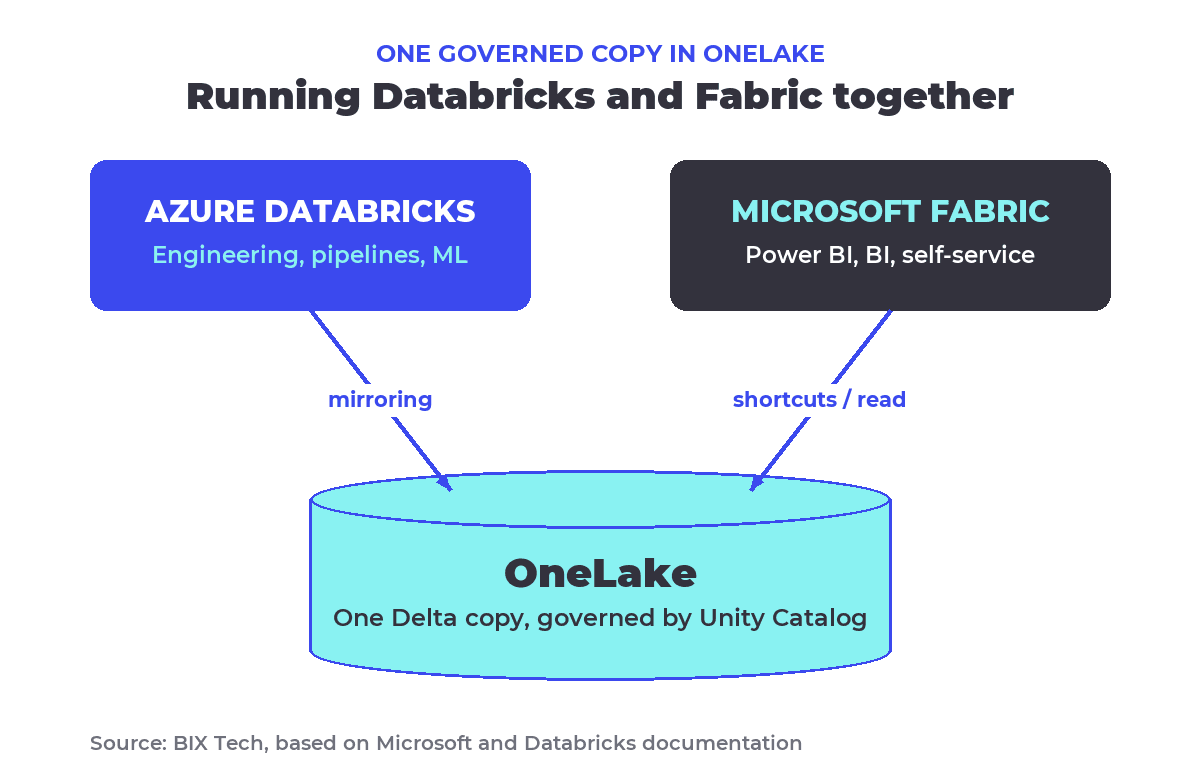 The common 2026 pattern: Databricks handles engineering and ML, Fabric and Power BI handle consumption, and one governed Delta copy lives in OneLake. Source: BIX Tech, based on Microsoft and Databricks documentation.
How to choose your Azure data platform
With the interoperability in place, the decision becomes less about walls and more about which platform owns each job. The scenarios below map common situations to the platform that usually fits best. Treat them as a starting point, not a rulebook, because the right answer always depends on the specific mix of skills, workloads, and budget in front of you.
| Your situation | Usually leans toward |
|---|---|
| Power BI is how the business consumes data | Microsoft Fabric |
| Microsoft-centric org with M365, Purview, and T-SQL skills | Microsoft Fabric |
| Predictable, capacity-based budgeting is a priority | Microsoft Fabric |
| Heavy data engineering, streaming, and very large scale | Azure Databricks |
| Advanced ML and MLOps are core to the roadmap | Azure Databricks |
| Multi-cloud strategy or avoiding lock-in | Azure Databricks |
| Complex pipelines plus broad BI consumption | Both, joined through OneLake |
A few common mistakes are worth naming, because they cost real money. Buying Fabric capacity and treating it as unlimited leads to throttling when one workload starves the rest. Running Databricks all-purpose clusters around the clock burns DBUs that serverless would have scaled to zero. Copying the same dataset into both platforms recreates the silo that mirroring exists to remove. And picking a platform by brand familiarity rather than by workload almost always produces regret at renewal time. Strong governance, whether through Unity Catalog and data trust controls or Purview, is what keeps a two-platform estate coherent instead of chaotic.
The Azure Databricks vs Microsoft Fabric question rarely has a single-vendor answer for a mature data estate. Fabric excels when Power BI and Microsoft alignment define how the business works with data, and Databricks excels when engineering depth, scale, and machine learning define the roadmap. The strongest move is to match each platform to the team and the workload it serves best, then use OneLake and Unity Catalog interoperability so the two never become a wall between your engineers and your decision-makers.
If your team is weighing Azure Databricks against Microsoft Fabric, or already runs both and wants a cleaner, better-governed architecture, our specialists can help you design the platform that fits your context. Talk to our team and move your data maturity forward. ⬇️

What is the difference between Azure Databricks and Microsoft Fabric? Azure Databricks is a code-first, multi-cloud lakehouse built on Apache Spark and Delta Lake, tuned for data engineering and machine learning. Microsoft Fabric is an Azure-only SaaS analytics suite built around OneLake and Power BI, tuned for business intelligence and self-service. Databricks starts from the engineer's notebook, Fabric from the analyst's report.
Is Microsoft Fabric replacing Azure Databricks? No. They target different users and workloads and increasingly work together. Since 2026, Databricks and Fabric can share one governed copy of data in OneLake through Unity Catalog mirroring, so most mature Azure estates run Databricks for engineering and ML and Fabric for Power BI consumption rather than choosing only one.
Which is cheaper, Databricks or Fabric? It depends on your workload. Fabric uses fixed capacity pricing (F-SKUs) that is predictable and often cheaper for steady, Power BI-heavy analytics. Databricks uses consumption pricing (DBUs plus VM) billed per second, which usually wins for variable or machine-learning-heavy workloads. Model your own usage before committing.
Can Azure Databricks and Microsoft Fabric work together? Yes. Both use open Delta and Iceberg standards, so they can operate over the same data in OneLake without copies. Databricks mirroring into OneLake is generally available, and reading OneLake from Databricks through Unity Catalog is in public preview, enabling a governed, two-platform architecture.
How do I choose between Fabric and Databricks? Match the platform to your team and workload. Choose Fabric for Power BI-first analytics, Microsoft-centric teams, and predictable budgets. Choose Databricks for heavy engineering, streaming, advanced ML, or multi-cloud needs. For estates that need both complex pipelines and broad BI, run the two together and connect them through OneLake.